How a Panel Redesign Helped Sales and Customer Success Teams Avoid Critical Setup Errors
I redesigned a complex admin tool used daily by Sales and Success teams to configure enterprise clients. The old system made critical errors too easy. I rebuilt it around clarity, feedback, and safer workflows, reducing support, stress, and risk.
0:00/1:34
Audio overview
MY ROLE ON THE PROJECT
I led the design end to end: discovery, stakeholder interviews, UX strategy, design execution, and implementation support. I worked closely with PM, Sales and CSM teams to surface risks and design for clarity and control.
MY ROLE ON THE PROJECT
I led the design end to end: discovery, stakeholder interviews, UX strategy, design execution, and implementation support. I worked closely with PM, Sales and CSM teams to surface risks and design for clarity and control.
MY ROLE ON THE PROJECT
I led the design end to end: discovery, stakeholder interviews, UX strategy, design execution, and implementation support. I worked closely with PM, Sales and CSM teams to surface risks and design for clarity and control.
Problem
A tool used daily for enterprise setup was becoming a liability.
Sales and Success teams used the Enterprise Panel to configure accounts, assign licenses, and turn features on and off. But the interface had grown unclear and risky.
People weren’t sure what actions would do, and one wrong click could block content access or misassign a license pool for a client.
Controls were scattered around and placed under obscure labels, there was no preview, no confirmation, and no clear structure. As a result Confidence was low, and mistakes were common.
Problem
A tool used daily for enterprise setup was becoming a liability.
Sales and Success teams used the Enterprise Panel to configure accounts, assign licenses, and turn features on and off. But the interface had grown unclear and risky.
People weren’t sure what actions would do, and one wrong click could block content access or misassign a license pool for a client.
Controls were scattered around and placed under obscure labels, there was no preview, no confirmation, and no clear structure. As a result Confidence was low, and mistakes were common.
Problem
A tool used daily for enterprise setup was becoming a liability.
Sales and Success teams used the Enterprise Panel to configure accounts, assign licenses, and turn features on and off. But the interface had grown unclear and risky.
People weren’t sure what actions would do, and one wrong click could block content access or misassign a license pool for a client.
Controls were scattered around and placed under obscure labels, there was no preview, no confirmation, and no clear structure. As a result Confidence was low, and mistakes were common.
BEFORE THE REDESIGN
BEFORE THE REDESIGN
BEFORE THE REDESIGN


Business complexity was rising fast:
The company was moving from a simple, flat pricing model to a tiered system.
Portfolios expanded from 2 (Tech and Marketing) to many, to personalise offers.
Legacy clients, exceptions, and contract-specific setups all needed to coexist.
Meanwhile, new CSMs needed to configure accounts on day one, but had no documentation or structured guidance. Every action felt potentially destructive, and risky.
What I found (through interviews & task-based observation)
New users were unsure what they were even allowed to do.
They didn’t know which toggles mattered, what license models meant, or whether clicking a button would break something.
New users were unsure what they were even allowed to do.
They didn’t know which toggles mattered, what license models meant, or whether clicking a button would break something.
New users were unsure what they were even allowed to do.
They didn’t know which toggles mattered, what license models meant, or whether clicking a button would break something.


Experienced users relied on workarounds.
Even power users avoided parts of the interface and trained new hires to proceed with caution.
Experienced users relied on workarounds.
Even power users avoided parts of the interface and trained new hires to proceed with caution.
Experienced users relied on workarounds.
Even power users avoided parts of the interface and trained new hires to proceed with caution.


Learning the panel took weeks or even months.
There was no structured onboarding, and much of the tool required institutional knowledge to use correctly.
Learning the panel took weeks or even months.
There was no structured onboarding, and much of the tool required institutional knowledge to use correctly.
Learning the panel took weeks or even months.
There was no structured onboarding, and much of the tool required institutional knowledge to use correctly.


How might we make internal setups feel safer and more predictable in a changing system?
I approached this by first mapping out what made the current experience risky. Through interviews and live task observation with both new and experienced users, I uncovered a pattern: people weren’t confused by the number of features—they were afraid of making a mistake.
How might we make internal setups feel safer and more predictable in a changing system?
I approached this by first mapping out what made the current experience risky. Through interviews and live task observation with both new and experienced users, I uncovered a pattern: people weren’t confused by the number of features—they were afraid of making a mistake.
How might we make internal setups feel safer and more predictable in a changing system?
I approached this by first mapping out what made the current experience risky. Through interviews and live task observation with both new and experienced users, I uncovered a pattern: people weren’t confused by the number of features—they were afraid of making a mistake.
Some users didn’t know what they were allowed to do. Others didn’t trust what would happen when they clicked a button. And almost everyone relied on memory, peer support, or workarounds like Ctrl+F to get through critical tasks.
From there, I restructured the panel to reduce ambiguity and surface consequences early, without slowing down the workflow too much. The redesign focused on three things:
Rebuilding the information architecture to address real, current problems, instead of stacking new logic on top of existing UX debt.
Making feature toggles and license models safer and more explicit
Supporting confident decisions through clearer feedback and guardrails
Legacy clients support
To ensure legacy clients who joined under an all-you-can-eat contract felt supported during the pricing redesign, we designed flexible, custom feature-panel settings that allow plans to be upgraded or downgraded at any time as needs evolve.
Legacy clients support
To ensure legacy clients who joined under an all-you-can-eat contract felt supported during the pricing redesign, we designed flexible, custom feature-panel settings that allow plans to be upgraded or downgraded at any time as needs evolve.
Legacy clients support
To ensure legacy clients who joined under an all-you-can-eat contract felt supported during the pricing redesign, we designed flexible, custom feature-panel settings that allow plans to be upgraded or downgraded at any time as needs evolve.
Early outcome
The redesign has only been live for a few months, but early signs point to meaningful improvements:
Early outcome
The redesign has only been live for a few months, but early signs point to meaningful improvements:
Early outcome
The redesign has only been live for a few months, but early signs point to meaningful improvements:
New CSMs are reporting higher confidence, earlier.
While onboarding still takes time, some recent hires say they feel comfortable navigating the panel weeks ahead of where others typically were.
New CSMs are reporting higher confidence, earlier.
While onboarding still takes time, some recent hires say they feel comfortable navigating the panel weeks ahead of where others typically were.
New CSMs are reporting higher confidence, earlier.
While onboarding still takes time, some recent hires say they feel comfortable navigating the panel weeks ahead of where others typically were.
Fewer support tickets are tied to misconfigurations.
Early tracking suggests a ~15% drop in error-related tickets linked to setup mistakes. A promising sign that the new structure and clearer UI are reducing confusion and risk.
Fewer support tickets are tied to misconfigurations.
Early tracking suggests a ~15% drop in error-related tickets linked to setup mistakes. A promising sign that the new structure and clearer UI are reducing confusion and risk.
Fewer support tickets are tied to misconfigurations.
Early tracking suggests a ~15% drop in error-related tickets linked to setup mistakes. A promising sign that the new structure and clearer UI are reducing confusion and risk.
These early outcomes suggest the redesign is not just more usable: it’s starting to build trust, reduce support needs, and prevent setup errors.
“I don’t feel like I need to double-check every click anymore — it’s more intuitive now.”
New CSM (informal post-launch feedback)
What I Learned
Internal tools often suffer from a lack of design ownership, even when the stakes are high.
This project reinforced how important it is to:
Design for ambiguity, not just for edge cases
Make mental models visible in the UI
Balance speed with safety in internal tools
What I Learned
Internal tools often suffer from a lack of design ownership, even when the stakes are high.
This project reinforced how important it is to:
Design for ambiguity, not just for edge cases
Make mental models visible in the UI
Balance speed with safety in internal tools
What I Learned
Internal tools often suffer from a lack of design ownership, even when the stakes are high.
This project reinforced how important it is to:
Design for ambiguity, not just for edge cases
Make mental models visible in the UI
Balance speed with safety in internal tools
Check out more projects
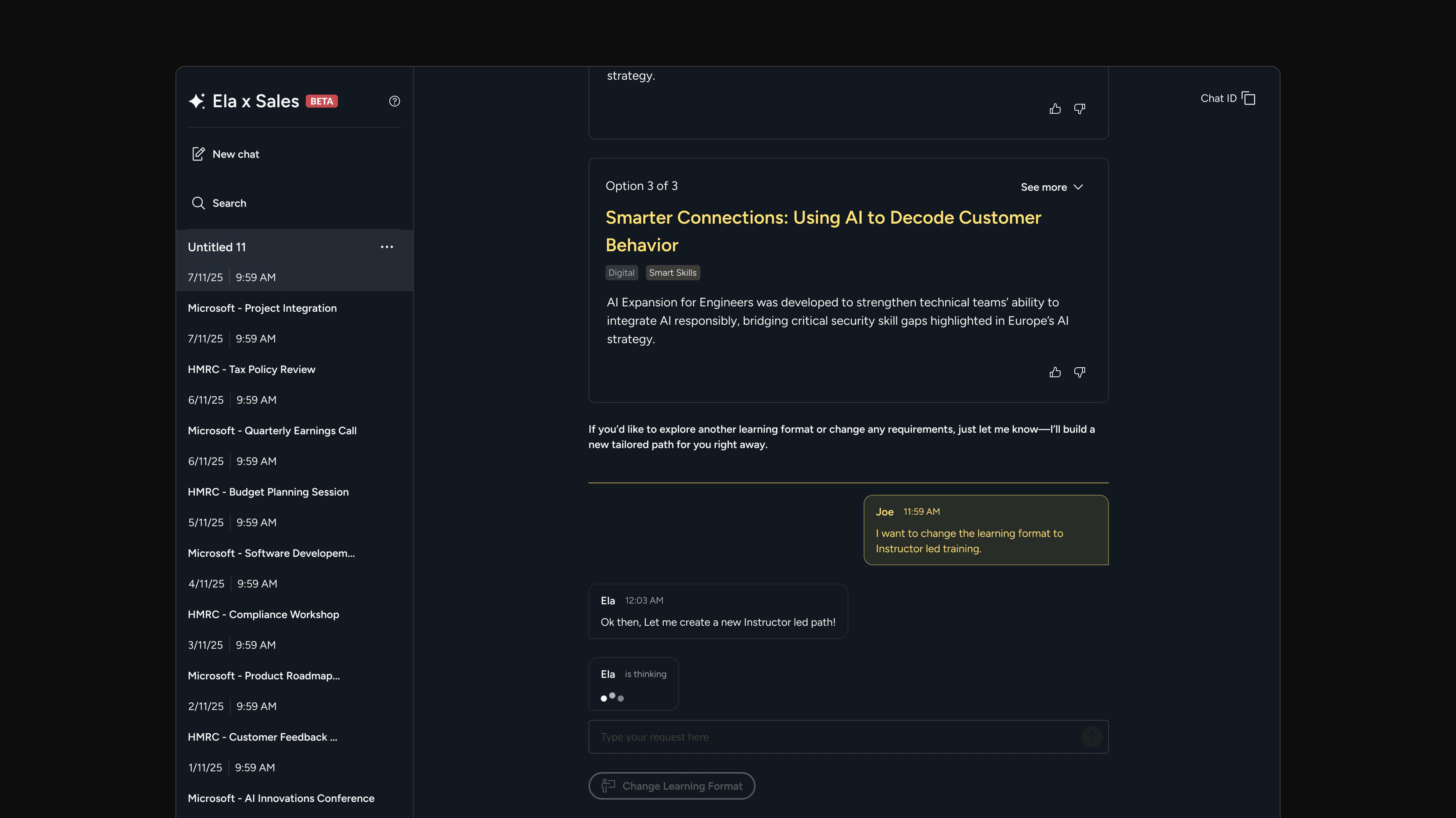
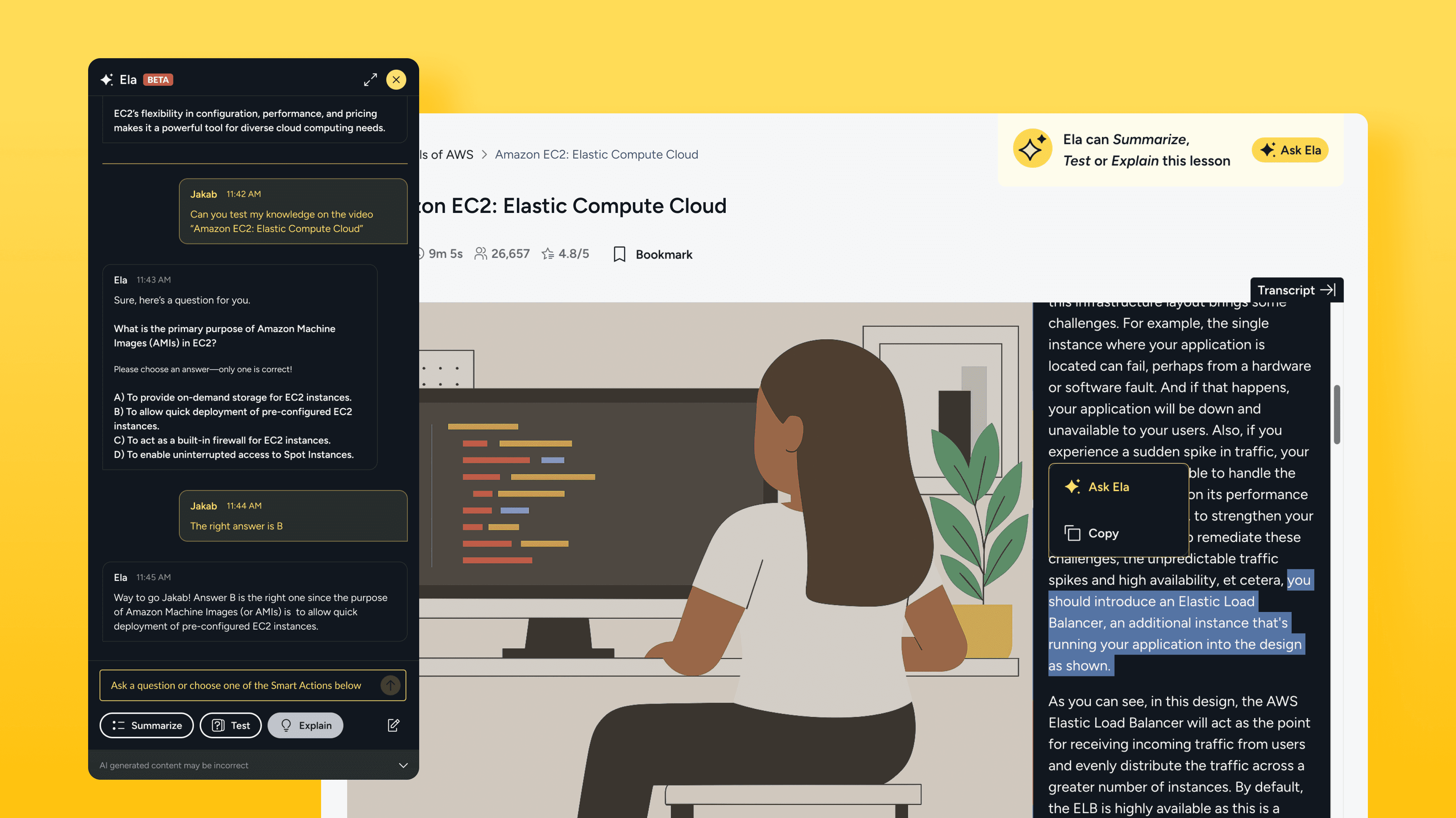
How I've helped QA users learn more confidently with an AI assistant.
I led the design for the 0-to-1 launch of QA’s learning assistant at the beginning of 2025. Created to reduce friction and support learning momentum, Ela is now adopted by 80+ client accounts and holds a 4.5/5 user satisfaction score.
Avg. rating 4.5/5: Strong validation for a beta release
How I've helped QA users learn more confidently with an AI assistant.
I led the design for the 0-to-1 launch of QA’s learning assistant at the beginning of 2025. Created to reduce friction and support learning momentum, Ela is now adopted by 80+ client accounts and holds a 4.5/5 user satisfaction score.
Avg. rating 4.5/5: Strong validation for a beta release
How I've helped QA users learn more confidently with an AI assistant.
I led the design for the 0-to-1 launch of QA’s learning assistant at the beginning of 2025. Created to reduce friction and support learning momentum, Ela is now adopted by 80+ client accounts and holds a 4.5/5 user satisfaction score.
Avg. rating 4.5/5: Strong validation for a beta release
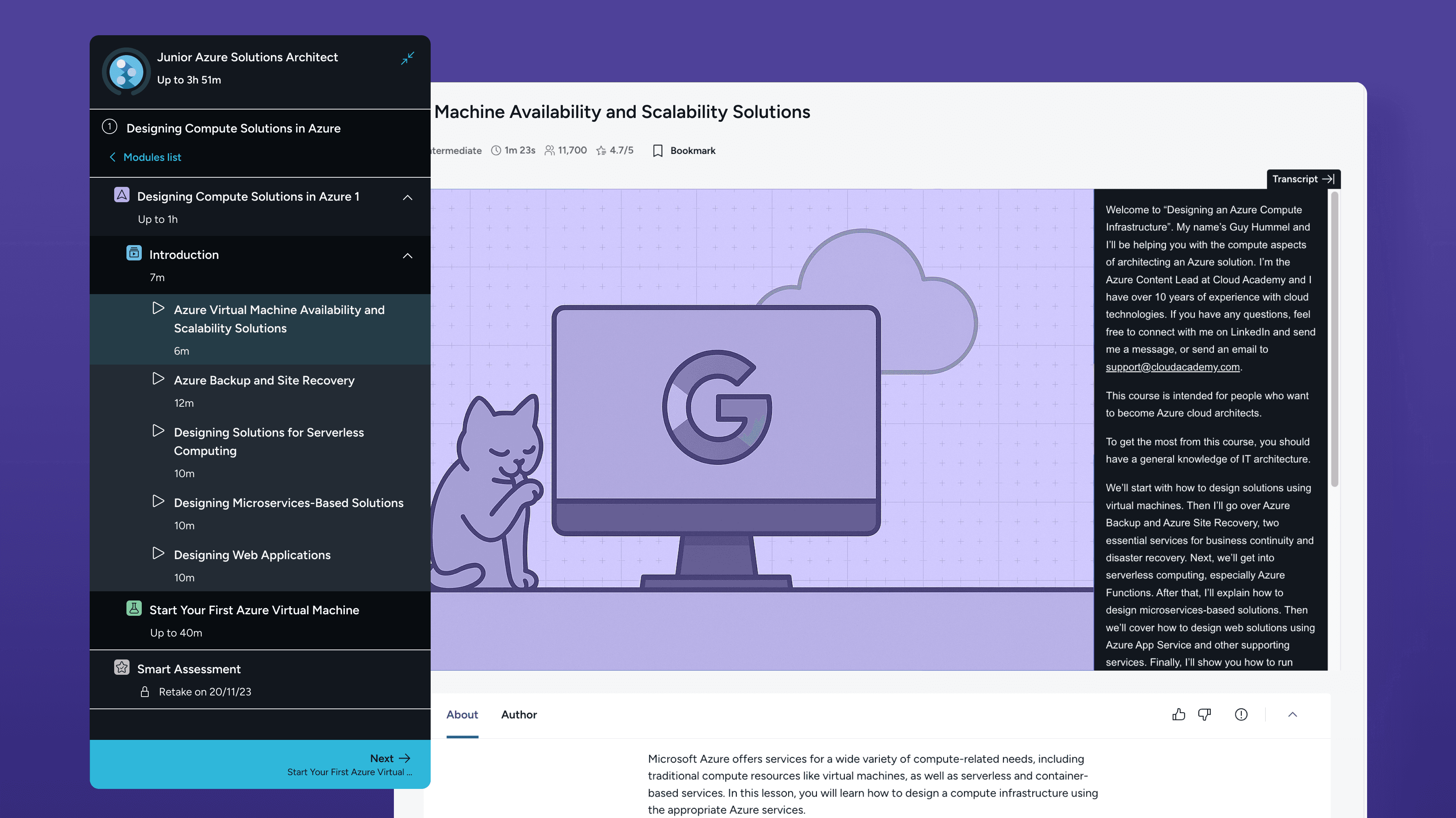
How I redesigned navigation to keep learners on track.
I designed a universal sidebar to unify all content types during a major content merger. Learners can now track their progress without leaving the lesson, reducing distractions.
53% drop in users exiting lessons to track progress
28% reduction in fullscreen toggling to study
How I redesigned navigation to keep learners on track.
I designed a universal sidebar to unify all content types during a major content merger. Learners can now track their progress without leaving the lesson, reducing distractions.
53% drop in users exiting lessons to track progress
28% reduction in fullscreen toggling to study
How I redesigned navigation to keep learners on track.
I designed a universal sidebar to unify all content types during a major content merger. Learners can now track their progress without leaving the lesson, reducing distractions.
53% drop in users exiting lessons to track progress
28% reduction in fullscreen toggling to study
How I simplified and unified a misaligned Text Lectures experience to support a major content merger.
I transformed fragmented Text Lectures into a unified, intuitive experience — resolving usability and progression issues to protect learner engagement and retention during Circus Street’s post-merger transition.
Resolved 5 out of 5 major UX inconsistencies: addressed and resolved all identified UX debt.
How I simplified and unified a misaligned Text Lectures experience to support a major content merger.
I transformed fragmented Text Lectures into a unified, intuitive experience — resolving usability and progression issues to protect learner engagement and retention during Circus Street’s post-merger transition.
Resolved 5 out of 5 major UX inconsistencies: addressed and resolved all identified UX debt.
How I simplified and unified a misaligned Text Lectures experience to support a major content merger.
I transformed fragmented Text Lectures into a unified, intuitive experience — resolving usability and progression issues to protect learner engagement and retention during Circus Street’s post-merger transition.
Resolved 5 out of 5 major UX inconsistencies: addressed and resolved all identified UX debt.
How I gamified learning at Cloud Academy boosting user motivation and MoM cashflow.
I designed a 3-month challenge that increased engagement, reduced churn, and boosted cashflow. 20% of participants stayed active three months after—well beyond typical subscription periods.
+18% increase in MoM upfront cashflow
How I gamified learning at Cloud Academy boosting user motivation and MoM cashflow.
I designed a 3-month challenge that increased engagement, reduced churn, and boosted cashflow. 20% of participants stayed active three months after—well beyond typical subscription periods.
+18% increase in MoM upfront cashflow
How I gamified learning at Cloud Academy boosting user motivation and MoM cashflow.
I designed a 3-month challenge that increased engagement, reduced churn, and boosted cashflow. 20% of participants stayed active three months after—well beyond typical subscription periods.
+18% increase in MoM upfront cashflow